
Social media platforms are constantly seeking ways to enhance user experience and promote healthy interactions.
Bluesky, a decentralized social media initiative, aims to give users greater control over their online interactions.
One key feature in this effort is the mute list, which allows users to curate their feeds and manage their digital environments effectively.
This article explores the functionality, benefits, and best practices for using mute lists in Bluesky, highlighting how they can improve your social media experience.
What are Mute Lists?
Mute lists are a moderation tool that enables users to hide posts from specific accounts without unfollowing or blocking them. This is one of the most unique features of Bluesky, separating it from other social media platform like Instagram or Facebook.
This feature is particularly useful for those who wish to minimize exposure to unwanted content while maintaining connections with others on the platform.
By utilizing mute lists, users can tailor their social media experience to align with their preferences and mental well-being.
Purpose and Functionality of Mute Lists
The primary purpose of mute lists is to empower users to control their feed.
Whether it’s due to overwhelming notifications, differing opinions, or simply wanting a break from certain topics, mute lists provide a flexible solution.
When a user mutes an account, they will no longer see that account’s posts in their timeline or notifications, allowing for a more personalized and enjoyable browsing experience.
How to Create a Mute List
Creating a mute list on Bluesky is a straightforward process. Here’s a step-by-step guide:
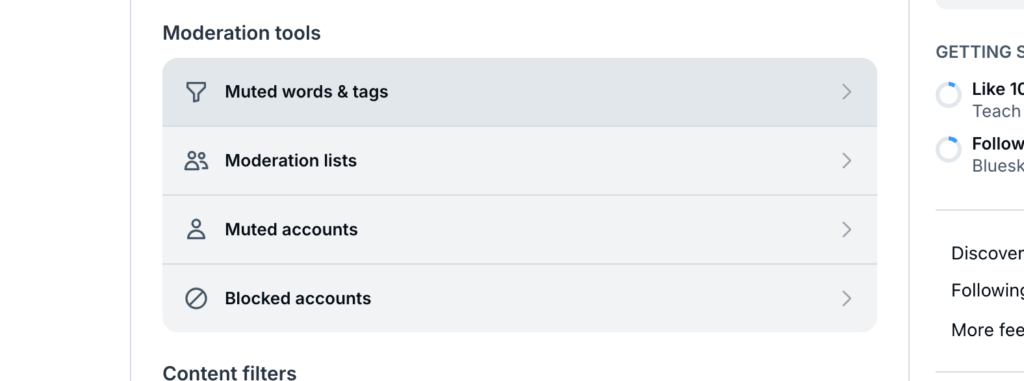
- Access Your Profile: Log into your Bluesky account and navigate to your profile settings.
- Locate Mute Lists: Head to Moderation, and find the tab named Moderation lists.
- Create a New List: Click on the option to create a new mute list. You will be prompted to name your list and provide an optional description.
- Add Users: Start adding accounts you wish to mute by searching for their usernames or selecting from your followers.
- Save Your List: Once you have added the desired accounts, save your mute list.
Tips for Naming and Describing Your Mute List
When naming your mute list, consider using descriptive titles that reflect its purpose (e.g., “Politics,” “Drama,” or “Work-Related”). A clear description can also help you remember why you created the list in the first place.
Populating Your Mute List
Adding users to your mute list can be done in several ways:
- Manual Addition: You can manually search for accounts you want to mute and add them one by one.
- Bulk Addition: If you have multiple accounts in mind, consider creating a bulk addition method by compiling usernames in advance.
- Using Timelines: While scrolling through your feed, if you encounter an account you’d like to mute, simply click on their profile and select the option to add them to your mute list directly.
Types of Mute Lists
Personal vs. Public Mute Lists
Mute lists can be categorized into personal and public types:
- Personal Mute Lists: These are private lists that only the creator can see. They are perfect for individual use without affecting others’ experiences on the platform.
- Public Mute Lists: Some users choose to share their mute lists with others, allowing followers to subscribe and benefit from curated content filtering. This can lead to community-driven moderation efforts.
Examples of Popular Public Mute Lists
Public mute lists can cover various topics such as:
- Political Discussions: Users may create lists that filter out political content during election seasons.
- Mental Health Breaks: Lists designed for users seeking a break from certain discussions or triggering topics.
Best Practices for Using Mute Lists
To maximize the effectiveness of your mute lists, consider the following best practices:
Strategies for Effective Use
- Regular Updates: Periodically review and update your mute lists as your interests change or as new accounts emerge.
- Thematic Organization: Organize your lists thematically (e.g., “Travel,” “Food,” “News”) for easier management.
- Temporary Muting: Use muting as a temporary measure during specific events or periods rather than as a permanent solution.
Avoiding Common Pitfalls
- Accidental Muting: Be cautious when adding users; double-check usernames to avoid accidentally muting friends or important accounts.
- Over-Muting: While it’s tempting to create extensive mute lists, overdoing it may lead you to miss valuable content or discussions.
Advanced Features and Tools
Bluesky offers additional moderation features that complement mute lists:
Additional Moderation Features
- Block Functionality: Unlike muting, blocking prevents any interaction with a user altogether.
- Reporting Mechanisms: Users can report accounts that violate community guidelines, enhancing overall platform safety.
- List Sharing Options: Users can share their public mute lists with others, promoting community engagement and shared interests.
Integration with Regular Lists
Bluesky allows integration between mute lists and regular follow lists, enabling users to streamline their social media management further. By combining these tools, users can curate both what they see and who they interact with more effectively.
Finding and Subscribing to Existing Mute Lists
Exploring existing public mute lists can enhance your experience on Bluesky:
How to Search for Existing Mute Lists
- Community Forums: Engage in community forums or discussion groups where users share their favorite mute lists.
- Social Media Promotions: Follow popular accounts that curate content about Bluesky features; they often share useful resources.
- Search Functions: Utilize Bluesky’s search functions to find specific topics related to public mute lists.
Impact of Mute Lists on User Experience
The introduction of mute lists has significantly impacted user experience on Bluesky:
Enhancing User Engagement
By allowing users more control over what they see, mute lists help reduce noise in feeds, leading to more meaningful interactions with content that matters most.
This increased focus can foster deeper connections and discussions around topics users genuinely care about, enhancing overall satisfaction with the platform.
User Testimonials and Experiences
Many users report feeling less overwhelmed by notifications after using mute lists. They appreciate being able to maintain relationships without engaging with every post from those they follow.
This sense of relief contributes to a more positive online atmosphere, where users can prioritize their mental well-being while still enjoying social interactions.
Conclusion
Bluesky’s mute lists serve as an essential tool for enhancing user experience by providing greater control over content visibility.
By understanding how to create and manage these lists effectively, users can cultivate a more enjoyable social media environment tailored to their preferences.
As social media continues evolving, features like mute lists will play a crucial role in fostering healthier online interactions while supporting individual well-being in digital spaces.


Lawanda Grisby
Read More