


Amir is the Segment Lead for Productivity and Creative at MUO. He’s a PharmD student who’s interested in clinical outcomes and Pharmacoeconomics. He loves looking at numbers and spreadsheets. His passion for data manipulation sparked during his early academic years, back when he used spreadsheets for lab reports.
Inspired by his father’s hobbies, Amir developed a knack for DIY projects and built his first quadcopter in high school. At 18, he began writing about 3D printing, and now contributes to MUO where he writes and edits productivity, spreadsheets, photography, music, and more.
Amir also enjoys creating music, although its categorization as such remains open to interpretation. In addition to his academic pursuits, Amir is an avid gamer, car enthusiast, and proud owner of a 1993 Mitsubishi Galant.
I like cars a lot, but I can’t afford the ones I really like. I’ve made a good compromise by driving a 1993 Mitsubishi Galant. It’s carbureted, has a cable throttle, and will outrun your fuel-efficient, sensor-adjusted modern economy car any day.
Jokes aside, one of the problems with old cars is parts. The more specific the part and the rarer it is to fail, the harder it is to find. In my case, the speedometer sensor died. I mean the actual physical sensor sitting on the gearbox. I’ve looked high and low and simply can’t get my hands on one. I’ll be in fifth gear, going very fast, but the speedometer proudly displays a solid 0.

You probably have an old Android lying around — here are 6 clever ways to use it
From a handheld gaming device to a wireless security camera, your old Android still has plenty to offer.
A digital fix for a very analog problem
Making my peace the speed
Since I couldn’t find a sensor, I started living with a dead speedo. The unintended upside is that I’ve grown incredibly attuned to my car. I know my speed by ear, by how the engine sounds, and by where the tachometer sits. If I’m in fifth and the revs sound a certain way, I know exactly what that translates to on the road. But I still wanted to see the number. It feels good.
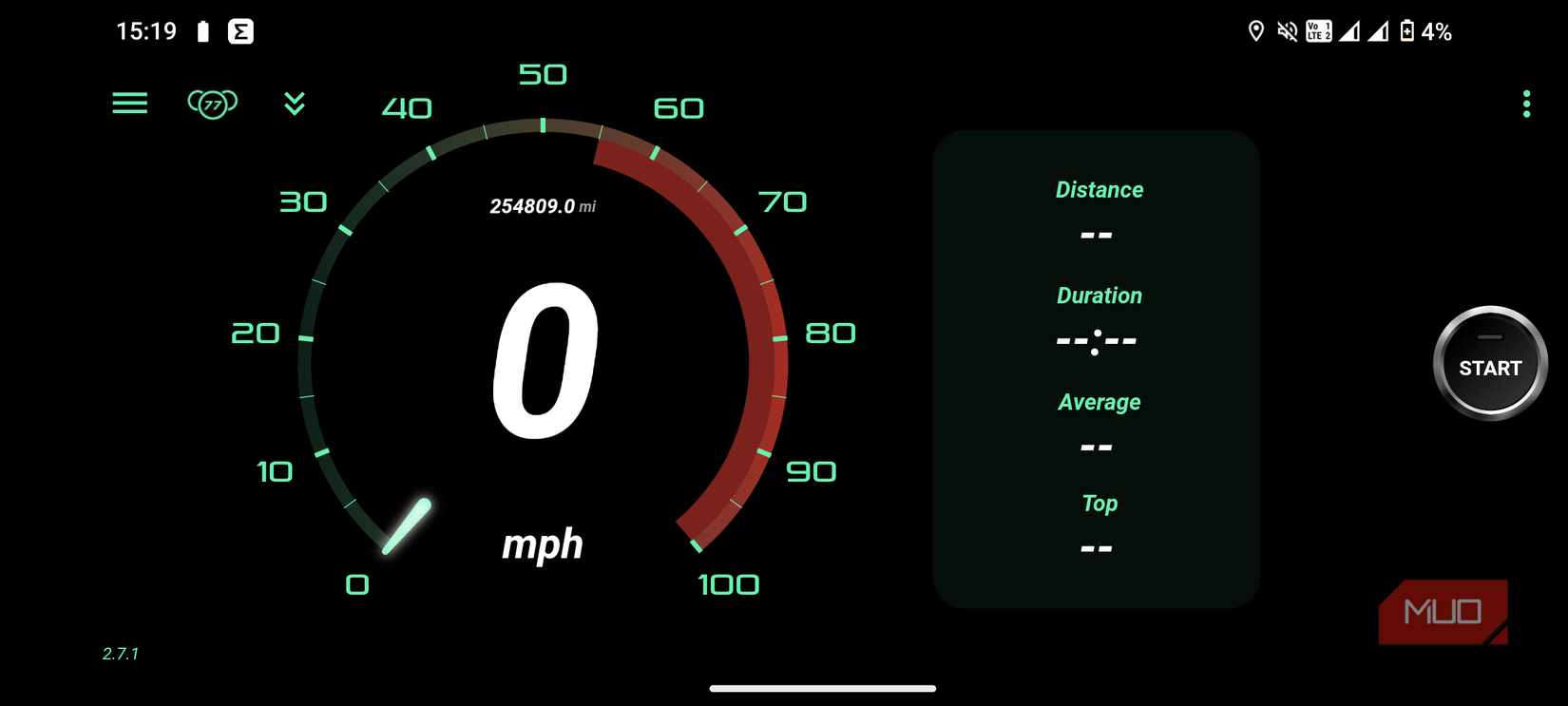
Google Maps does show your speed while navigating, but the number is tiny, and sometimes it decides not to show it at all. I haven’t found a consistent setting for this. I wanted something bigger and bolder that I could glance at while driving without squinting. I settled on an app called GPS Speedometer.
It has a nice 90s-style UI, the speed readout is huge, and it even includes an odometer. Until recently, my system was simple: whenever I wanted to see my speed, I’d open the app, toss the phone on the passenger seat, and glance at it occasionally. Then, while poking around the settings, I noticed a button labeled “HUD.”
The old boy gets a HUD
Windshield glow-up
When you enable HUD mode, the app mirrors the display. That’s when I realized it’s designed to be projected onto the windshield. So I tried it. It works best in landscape, so I locked the orientation, enabled HUD to get the mirrored view, switched to dark mode for a black background, and cranked the brightness. Then I slipped the phone under the windshield.
And there it was! My 34-year-old car suddenly had a heads-up display. It’s ridiculously simple. There’s no drilling, no rewiring, no fiddling with mounts or brackets. I just open the app, toggle HUD, and slide the phone into place.
OLED screens also help here. Dark mode dramatically reduces power usage because only the illuminated pixels draw power. If your spare Android has an OLED panel like mine, the big numbers are the only thing consuming battery; the black background costs nothing. Battery life becomes a non-issue. If you want to stretch it further, disable every unnecessary app and background service, then launch the GPS app after a fresh restart.
The advantage of this setup compared to the analog OEM is that the speed is GPS-based. It’s more accurate than whatever your car’s analog speedometer claims. Mechanical speed sensors are notoriously prone to error — especially if you change tire sizes — and they almost always overreport by around 10%, which really adds up at high speeds.
Turning a spare Android into a full-blown HUD
The cheapest full-blown HUD upgrade
I’ve tried it in daylight, and although it’s not as bright or dramatic as at night, it’s still visible and still cool. As I said, I don’t need it to know my speed — I already know my car inside out. This is mostly for flair.
Functionally, the app has plenty going for it. You can track trips, review average speed and total distance, and view your route pinned on a map. You can also input your existing odometer reading so future trips increment from that point. If your speedometer is broken like mine, then your odometer is useless too — so having a digital fallback is genuinely helpful.
Speaking of flair, the app includes two dashboards you can switch between. I prefer the big angry red one because it’s the most visible. There are fancier designs available for a one-time $0.99 payment, and I genuinely appreciate that the payment adds something instead of removing something like… ads. A driving companion app showing ads would be a disaster, and thankfully, this app has none.
You can also set a speed alarm so it beeps if you exceed a certain limit. I, of course, have this disabled.
A tiny upgrade with a big charm
My spare Android now lives permanently under the windshield. It holds its charge surprisingly well since I use it for nothing else. It would last even longer if I stripped the phone down to just the essentials. I also have a fast charger in the car, so topping it up takes minutes, but I’ve been thinking about wiring a permanent connection so it never needs charging at all. That’s still under consideration. Maybe I’ll make my own app and use it as an Android Auto head unit.
The speedo is nothing life-changing, but it does make me appreciate my old car more — a tiny touch of modern tech in a very analog machine. The Android phone isn’t doing much under the windshield, but it’s doing a lot more than collecting dust on a shelf, and that’s enough to make me happy.
Dion Wrona
Read More