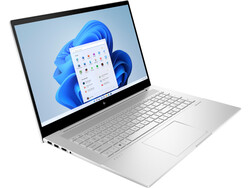
Large allrounder. A large display with a high, 4K resolution in a simple case together with computing power from Intel’s 12th generation, 32 GB of DDR4 RAM, and a dedicated GeForce GPU – the HP Envy 17-cr0079ng package sounds interesting. Find out in our Notebookcheck test whether the multimedia laptop is also convincing users in practice.
HP’s Envy model series stands for powerful laptops for mobile creative professionals. In this series, the manufacturer offers models beginning from compact 13.3 up to large 17.3-inch sizes. The HP Envy 17-cr0079ng is positioned at the top end, bringing a large 17.3-inch UHD display in this model version.
Under the hood, the HP Envy 17-cr0079ng is able to offer some good equipment as well: HP uses the Intel Core i7-1255U processor of the 12th generation (Alder Lake), combining this with a dedicated Nvidia GeForce RTX 2050 Laptop lower mid-range GPU with 4 GB GDDR6, 32 GB DDR4 working memory, and a large, 1-TB SSD. Together with a 55-Wh battery, this results in a ~2.5 kg (~5.5 lb) 17-inch laptop that now has to prove itself in our test.
In our review, the Envy 17 has to compete against other laptops with the Core i7-1255U, such as the more compact HP ProBook 450 G9 6A180EA, and also the same graphics solution, such as the Acer Aspire 5 A515-57G-53N8 and the 17-inch LG Gram 17 endurance champion.
Processor
Intel Core i7-1255U 10 x 1.2 – 4.7 GHz, 46 W PL2 / Short Burst, 15 W PL1 / Sustained, Alder Lake-U
Memory
32 GB
, DDR4-3200 dual-channel
Display
17.30 inch 16:9, 3840 x 2160 pixel, BOE0A66, IPS, glossy: yes, 60 Hz
3 USB 3.1 Gen2, 2 USB 4.0 40 Gbps, 2 Thunderbolt, USB-C Power Delivery (PD), 1 HDMI, 2 DisplayPort, Audio Connections: Combo, Card Reader: SD
Networking
Intel Wi-Fi 6E AX211 (a/b/g/h/n = Wi-Fi 4/ac = Wi-Fi 5/ax = Wi-Fi 6/ Wi-Fi 6E 6 GHz), Bluetooth 5.3
Size
height x width x depth (in mm): 19.6 x 398 x 259 ( = 0.77 x 15.67 x 10.2 in)
Battery
55 Wh Lithium-Ion, Li-Ion-Polymer battery, 4 cells, Battery runtime (according to manufacturer): 7.3 h
Charging
fast charging / Quickcharge
Operating System
Microsoft Windows 11 Home
Camera
Webcam: 1 Primary Camera: 5 MPix HP True Vision 5MP infrared camera with camera aperture
Additional features
Speakers: 2, Keyboard: chiclet, Keyboard Light: yes, 90 W USB Type-C charger, 24 Months Warranty
Weight
2.556 kg ( = 90.16 oz / 5.64 pounds), Power Supply: 455 g ( = 16.05 oz / 1 pounds)
Note: The manufacturer may use components from different suppliers including display panels, drives or memory sticks with similar specifications.
The HP Envy 17 presents itself in a simple design in silver color. Even though most of the case is made from plastic, it offers a high-quality impression with good workmanship. The wide hinge keeps the large display fairly tightly in place, so that you have to use both hands to open the laptop.
As a 17-inch laptop, the HP Envy 17 is of course not very compact. But thanks to the slim display bezels particularly on the left and right side, the overall size remains within limits. Compared to the other large 17-inch devices, it places in the middle of the test field.
The ~2.5 kg (~5.5 lb) weight plus 500g (~1.1 lb) for the charger have an impact on mobile use. A large display diagonal demands its due. However, even at that size, laptops can even be lighter, as the competitors show. Our test unit is one of the heaviest models here, which is a negative point for mobile usage.
The Envy 17 offers extensive port equipment, except for a LAN port. Included are two Thunderbolt 4 ports with USB 4 Type-C for data transfer up to 40 Gbit/s, charging, and DisplayPort 1.4, with both of the ports positioned on the right side. In some situations, distributing them over both sides would be more desirable. One of the Thunderbolt ports is used by the included charger to provide the power.
On the left side, an HDMI-2.1 port allows you to connect an external monitor, alternatively to the DisplayPort connection. Three additional USB-A ports distributed over both sides are sufficient, and there is also an SD card reader. All the connections are easily accessible.
The built-in SD card reader isn’t one of the fast representatives of its kind. In our measurements using our AV PRO microSD 128 GB V60 reference storage card, it always places last, but the distance behind most of the competitors isn’t very far. However, those who often need to copy large amounts of data from a storage card will still be better served by other devices.
The Wi-Fi 6E AX211 module from Intel used here ensures a speedy WLAN connection that almost remains constant over time. Our measurements are at the level of the average for this WLAN module. A wired network connection in form of a LAN port or a mobile connection is not available.
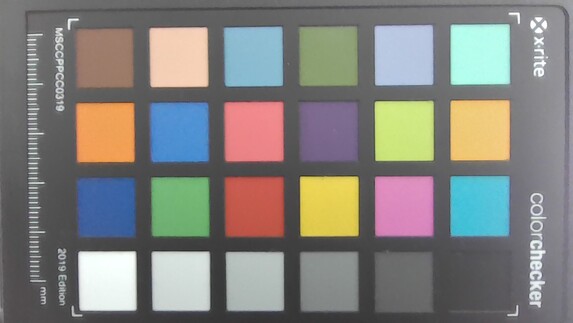
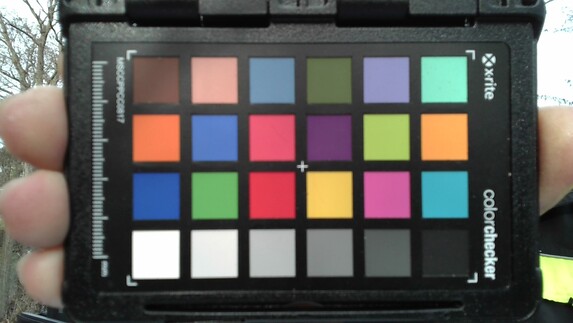
The HP True Vision infrared camera is set in the center of the top display bezel. It offers temporary noise suppression and an integrated dual-array digital microphone. At 5 MP, its resolution is fairly high, and it can also be used for Windows Hello. While the image quality is good, it has a slight red tint. Compared to the competitors in our test, it has the second lowest color deviation with a solid ∆E of 8. This is absolutely sufficient for professional or private video calls.
A nice gimmick: the privacy shutter is not opened and closed manually via slider but via keypress on the keyboard. In addition, a small light next to the camera indicates when this is activated.
In addition to privacy protection for the camera, the HP Envy 17 also supports the Trusted Platform Module (firmware TPM). There is no Kensington Lock or fingerprint sensor, but Windows Hello is supported for unlocking via face recognition.
HP includes a powerful 90-Watt USB-C charger with the laptop. Optionally, HP also offers a number of accessories, but they are not specifically designed for this laptop.
The access to the insides is blocked by five tiny Torx screws. Once you gained access, you are hardly offered any opportunities for maintenance. There are no free slots for storage expansion, but considering it already offers 32 GB of RAM, this shouldn’t be too hard to accept. The battery, the M.2 SSD, and the Wi-Fi module can be replaced.
In Germany, HP offers a 2-year manufacturer’s warranty for parts and labor.
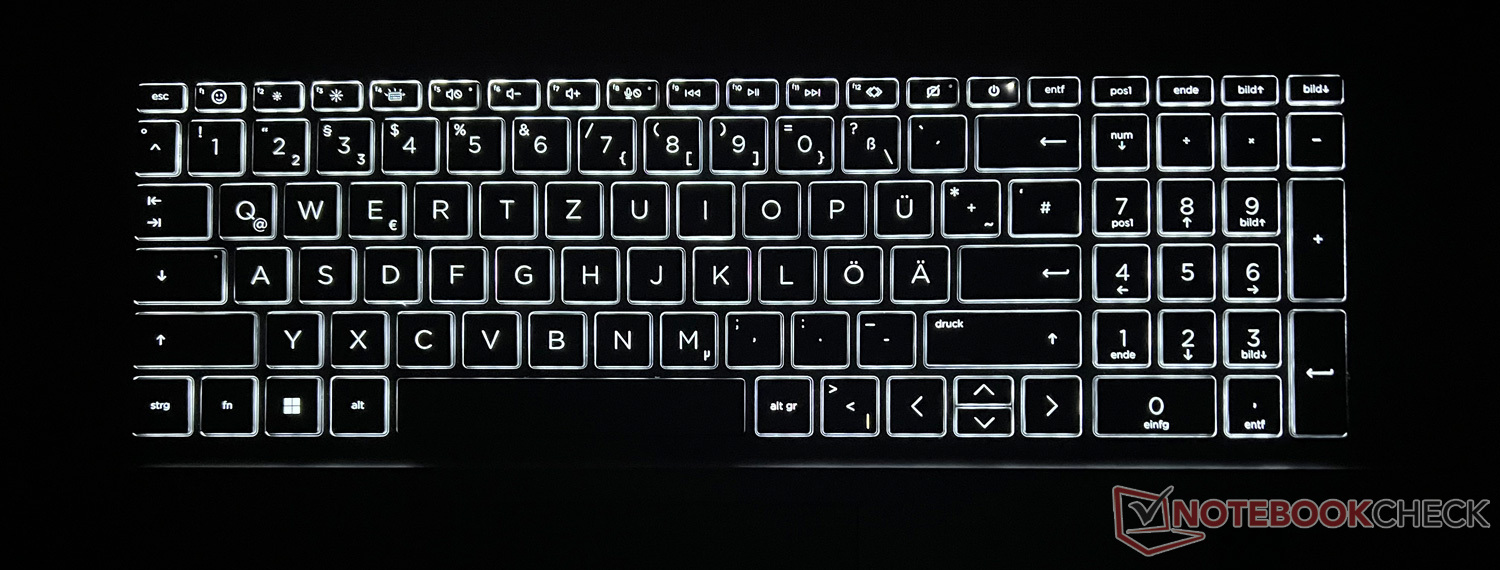
A 17.3-inch display diagonal also means that there is a lot of space for the keyboard. Aside from about 3 cm (~1.2 in) on the edges, HP uses this space for a sufficiently large keyboard together with a numpad on the side.
At about 1.7 x 1.7 cm (~0.67 in), the keys are sufficiently large, and with a key stoke of around 2 mm (~0.08 in), the keyboard offers a comfortable typing experience. The manufacturer occupies the F1 to F12 keys with the usual additional functions, for example to control the three-step keyboard illumination, volume, display brightness, or the camera shutter we already mentioned. On the right side is the power key to turn on the device.
The numpad is convenient particularly for number input. The keyboard illumination ensures an even key illumination and good readability of the labels.
Even keyboard illumination
The touchpad is placed below the keyboard slightly to the left of the center. At around 12.5 x 8 cm (~4.9 x 3.15 in), we neither have any reason for complaint about the size nor about the haptics, thanks to the smooth surface. Left clicks are possible on almost the whole surface of the touchpad, and aside from the right bottom corner, right clicks as well. There is no haptic separation of the areas, but in everyday operation you won’t notice that this is missing.
The response to inputs is swift and without any problems. Multi-touch gestures such as scrolling with two fingers or zooming in and out are supported.
HP has equipped the Envy 17-cr0079ng with a large 17.3-inch, high resolution 4K IPS panel from BOE with 3,840 x 2,160 pixels, 60 Hz, and short response times. Alternatively, you can also choose versions with an FHD display in this model series.
The manufacturer promises a display brightness of 400 Nits, which we are able to confirm in our test measurements in some spots and also almost on average across the whole area. In our comparison field, our test unit offers one of the brightest displays, but unfortunately that doesn’t help when using it outdoors, since the manufacturer has decided to use a reflective version. Even though that looks great, it also creates strong reflections, making the contents hardly recognizable outdoors (see pictures below). Indoors, this works better, but you still get annoying reflections from light sources such as lamps or windows.
In terms of the black value and contrast, the HP Envy 17 is surpassed by most of our competitors. In our comparison field, the display produces one of the best overall results, but it also suffers from some slight clouding and significant backlight bleeding, meaning that you can see some lighter spots in the background illumination at the edges when dark contents are displayed.
The device also offers a good color reproduction compared to the competitors, as the low Delta E measurements show. The values that are already fairly balanced in the state of delivery can be further improved by a calibration.
Display Response Times
ℹ
Display response times show how fast the screen is able to change from one color to the next. Slow response times can lead to afterimages and can cause moving objects to appear blurry (ghosting). Gamers of fast-paced 3D titles should pay special attention to fast response times.
↔ Response Time Black to White
7 ms … rise ↗ and fall ↘ combined
↗ 1 ms rise
↘ 6 ms fall
The screen shows very fast response rates in our tests and should be very well suited for fast-paced gaming. In comparison, all tested devices range from 0.4 (minimum) to 240 (maximum) ms. » 13 % of all devices are better. This means that the measured response time is better than the average of all tested devices (22.5 ms).
↔ Response Time 50% Grey to 80% Grey
1 ms … rise ↗ and fall ↘ combined
↗ 0 ms rise
↘ 0 ms fall
The screen shows very fast response rates in our tests and should be very well suited for fast-paced gaming. In comparison, all tested devices range from 0.25 (minimum) to 636 (maximum) ms. » 1 % of all devices are better. This means that the measured response time is better than the average of all tested devices (35.4 ms).
Screen Flickering / PWM (Pulse-Width Modulation)
ℹ
To dim the screen, some notebooks will simply cycle the backlight on and off in rapid succession – a method called Pulse Width Modulation (PWM) . This cycling frequency should ideally be undetectable to the human eye. If said frequency is too low, users with sensitive eyes may experience strain or headaches or even notice the flickering altogether.
Screen flickering / PWM not detected
In comparison: 53 % of all tested devices do not use PWM to dim the display. If PWM was detected, an average of 19122 (minimum: 2.4 – maximum: 3846000) Hz was measured.
The reflective display creates some problems when using it outdoors. The IPS display offers the good viewing angle stability that is typical for this kind of panel.
In our cr0079ng (72W72EA) test configuration, the HP Envy 17 is equipped with the Core i7-1255U from Intel’s 12th processor generation (Alder Lake U). The manufacturer combines this with an additional 32 GB of DDR4 3200 MHz RAM (2x 16 GB) and a large 1-TB PCIe NVMe M.2 SSD. Depending on the demands, the dedicated Nvidia GeForce RTX 2050 Laptop GPU with 4 GB GDDR6 or the internal Intel Iris Xe Graphics handle the graphics output.
Alternatively, HP also offers the Envy 17 in many other configurations, for example with less RAM and storage or different CPUs such as the Intel Core i5-1235U or Core i7-1260P.
With the Command Center, HP offers its own tool, allowing you to choose among the performance modes “Balanced,” “Performance,” and “Cool,” as well as a “Power Saving” mode in battery operation, or you can also select an automatic “Intelligent Adjustment” mode. For our benchmarks, we usually chose the “Performance” HP mode together with the “Best Performance” Windows setting.
Performance mode
Intelligent Adjustment mode
Cool mode
Power Limit 1
18 Watt
15 Watt
10 Watt
Power Limit 2
51 Watt
46 Watt
15 Watt
The Core i7-1255U used here comes from Intel’s 12th processor generation (Alder Lake) and is designed for high-end laptops. The ten-core processor consists of two Performance and eight Efficiency cores, resulting in twelve threads due to hyperthreading of the P cores. The clock speed ranges between 1.7 and 4.7 GHz.
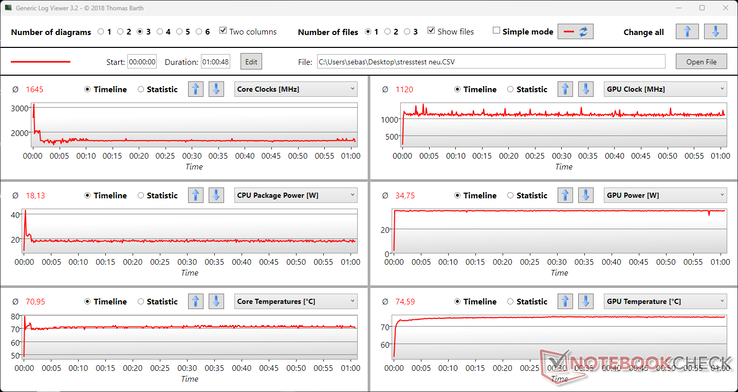
In the CPU benchmarks during our tests, the HP Envy 17 delivers mostly very good results, usually positioning above the average for the CPU and the competitors with the same CPU. In our constant load test, the performance is also available constantly. In battery operation, the performance is reduced by around 70%.
In practical operation, the hardware used here delivers more than a solid performance. In benchmarks such as PCMark 10, the laptop is able to keep up well with the top of the field and is mostly only surpassed by the two laptops that are equipped with more powerful hardware. Those who want even more performance are even better served by the Intel Core i7-12700H in the Dell XPS 17 9720, for example.
For some strange reasons, the Creative Benchmark test of PCMark 8 was always interrupted in the middle with the hardware and driver configuration of our test unit. We therefore left out this benchmark.
Our test unit shows relatively high DPC latencies. While this could be an indication that some problems might occur with real-time audio and video processing, as always this is also only a momentary snapshot of the current driver configuration.
DPC Latencies / LatencyMon – interrupt to process latency (max), Web, Youtube, Prime95
The 1-TB SSD from Samsung doesn’t perform particularly well in our test measurements. Not only does it place behind most of the other competitors but also below the average level for the SSD. HP didn’t do itself any favors with this choice, but you still wouldn’t notice any limitations during daily operation. At least the values remain almost identical in the constant performance, without starting to be throttled.
While the Intel Iris Xe Graphics iGPU handles the less demanding graphics tasks, with higher demands the Nvidia GeForce RTX 2050 Laptop GPU is activated. With this, a dedicated graphics solution of the lower midrange is onboard. However, the GPU also comes from 2021 so it is no spring chicken anymore. The graphics card is equipped with 4 GB GDDR6 graphics storage and runs at a clock speed of up to 1,477 MHz. It is unable to keep up with the GeForce RTX 4050 that was recently introduced by Nvidia, which leaves it far behind.
In the graphics benchmarks, the HP Envy 17-cr0079ng reaches solid values in our test. Even though they remain in parts below the average of this graphics solution, they are always above those of the lightweight LG Gram 17Z90Q endurance champion and at the level of the Acer Aspire 5 A515, which are both equipped with the same dGPU.
In mains operation, the graphics performance remains constant over time, as the stress test of 3DMark (result: 99%) shows. In battery operation, the laptop still reaches 80 to 90% depending on the benchmark (3DMark 11: 11,017 graphics points).
For a cultivated round of gaming with the HP Envy 17 multimedia laptop, the dedicated graphics solution is easily sufficient. Most of the games we chose for our test run smoothly at high or often even maximum graphics settings in FHD resolution. However, the GPU will hardly allow you to enjoy the full 4K resolution of the display.
An annoyance: Using the “Performance” mode in the HP Command Center, many games minimized when changing the display resolution, and we were unable to continue them afterward, or they even crashed completely. We were unable to get a handle on this problem during our tests of the HP Envy 17. Therefore, some of the game measurements were only performed using the “Intelligent Adjustment” mode, where the problem didn’t occur.
In our “The Witcher 3” constant load test, the frame rate remains at a constant level, and we don’t measure any drops.
During idle operation and under low load, the HP Envy 17 is not audible. Under some light demands, the two fans for CPU and GPU purr constantly, without being particularly annoying. On the other hand, if you challenge the built-in hardware (for example during gaming), the device reaches a noise level of up to 48 dB. The “Intelligent Adjustment” mode hardly brings any noise advantages when the load is slightly lowered.
Our test unit does not produce any other annoying noises.
During idle operation, the laptop gets hardly any warmer than room temperature. Under load, a hotspot develops in the center in front of the display, which then expands toward the keyboard, reaching temperatures close to the 50-°C mark (122 °F). While this warming is noticeable while typing, it doesn’t become too uncomfortable.
37.4 °C 99 F
47.1 °C 117 F
37.9 °C 100 F
30.3 °C 87 F
41.1 °C 106 F
38.7 °C 102 F
25.9 °C 79 F
26.6 °C 80 F
29.4 °C 85 F
Maximum: 47.1 °C = 117 F Average: 34.9 °C = 95 F
43 °C 109 F
43.8 °C 111 F
33.9 °C 93 F
39.3 °C 103 F
40.6 °C 105 F
31 °C 88 F
26.6 °C 80 F
26.4 °C 80 F
23.5 °C 74 F
Maximum: 43.8 °C = 111 F Average: 34.2 °C = 94 F
Power Supply (max.) 53 °C = 127 F | Room Temperature 23.5 °C = 74 F | FIRT 550-Pocket
(±) The average temperature for the upper side under maximal load is 34.9 °C / 95 F, compared to the average of 31.1 °C / 88 F for the devices in the class Multimedia. (-) The maximum temperature on the upper side is 47.1 °C / 117 F, compared to the average of 36.8 °C / 98 F, ranging from 21.1 to 71 °C for the class Multimedia. (±) The bottom heats up to a maximum of 43.8 °C / 111 F, compared to the average of 39.1 °C / 102 F (+) In idle usage, the average temperature for the upper side is 23.9 °C / 75 F, compared to the device average of 31.1 °C / 88 F. (±) Playing The Witcher 3, the average temperature for the upper side is 34.5 °C / 94 F, compared to the device average of 31.1 °C / 88 F. (+) The palmrests and touchpad are cooler than skin temperature with a maximum of 31.7 °C / 89.1 F and are therefore cool to the touch. (-) The average temperature of the palmrest area of similar devices was 28.8 °C / 83.8 F (-2.9 °C / -5.3 F).
The stereo loudspeakers from Bang & Olufsen can play relatively loud and offer fairly balanced mids and highs. However, the bass is lacking almost completely. Overall, our test unit places in the lower half the multimedia field in terms of the audio reproduction. Particularly for music or gaming, we recommend connecting headphones or a headset via the 3.5-mm audio port.
HP has equipped our Envy 17 test unit with a 55-Wh battery. With this, it is slightly larger than that of most other comparison devices. Only the LG Gram 17 endurance champion and the Dell XPS 17 power laptop have significantly larger batteries.
However, the battery size is only reflected to a limited sense in the battery life of our test unit. In the comparison field, our device places last, which is probably due mainly to the fairly bright, high-resolution 4K display. Under load, the battery runs out after only about 90 minutes, and while surfing or watching videos, the values don’t really invite some enthusiasm either with about 4.5 and 5.5 hours respectively.
The HP Envy 17-cr0079ng was provided by the manufacturer for our test.
In our test, the HP Envy 17-cr0079ng presents itself as a balanced multimedia laptop. Thanks to its solid CPU performance and dedicated entry-level GeForce, it can also be used for playing video games, as long as the demands aren’t too high. Those looking for more can find it in the Dell XPS 17 for example.
One of the highlights should really be the large and bright display with a UHD resolution. Thanks to its high-gloss design it also looks really good, but that turns out to be a problem with light reflections or outdoors.
The laptop also shows some weaknesses in the battery life, so it is not an ideal companion for outdoor or mobile use. Those who want to be able to work away from the outlet for as long as possible should definitely choose another laptop such as the extremely long-lasting LG Gram 17.
Overall, the HP Envy 17 scores in our test with more strengths than weaknesses but is unable to really stand out in any area. It offers a good mixture for multimedia, gaming, and Office but also costs a hefty price at an MSRP of almost 2,000 Euros (~$2,210). Other devices offer more for the money here, such as the Acer Aspire 5 A515-57G with the same dGPU but without 4K display costing only half as much, or the even more expensive but also more powerful and overall more “perfect” Dell XPS 17.
The HP Envy 17 is available in many configurations from HP starting from $699.99. A model with an almost similar configuration as our test unit (Intel Core i7-1260P instead of i7-1255U, 32 GB RAM, 1-TB SSD, QHD display) but lacking the dedicated graphics card is available for $1309.99, and another configuration with the graphics card but less RAM and a smaller FHD screen costs $1049.99.
HP Envy 17-cr0079ng
–
03/28/2023 v7
Marcus Schwarten
Connectivity
73 / 80 → 91%
Games Performance
84 / 90 → 93%
Application Performance
93 / 90 → 100%
Multimedia – Weighted Average
Transparency
The present review sample was made available to the author as a loan by the manufacturer or a shop for the purposes of review. The lender had no influence on this review, nor did the manufacturer receive a copy of this review before publication. There was no obligation to publish this review.
Pricecompare
I have been fascinated by technology for around 25 years – especially technology that makes life easier rather than more complicated. Mobile devices such as laptops, smartphones, tablets, and smartwatches are particularly close to my heart as is the booming subject of smart homes. I have been working in these areas for several years now as a news and reviews editor. I have been active with various websites, including the smart home blogs homee, Nuki, and siio, as well as tech portals such as Giga and TechRadar. I have been writing news and laptop reviews for Notebookcheck since 2020.
Translator:Mark Riege – Translator – 415 articles published on Notebookcheck since 2018
Having worked as a programmer for 20 years (medical devices, AI, data management systems), I’ve been following the computer scene for many years and especially enjoy finding out about new technology advances. Originally from Germany but living in the US, I’ve been working as a translator more recently, with Notebookcheck allowing me to combine my interest in new devices and translation. Other interests include Buddhism, spending time in Tibetan monasteries, and translating ancient Tibetan texts.
Business seminar in Munich highlights Hong Kong's strategic roles amidst global shifts (with photos) ****************************************************************************************** The Hong Kong Economic and Trade Office, Berlin (HKETO Berlin), promoted Hong Kong's unique advantages and strategic roles at the seminar "Hong Kong's strategic role amidst geopolitical tensions" on June 18 (Munich time) in Munich, Germany. Senior executives, investors
Business Insurance-AZ achieves milestone response speeds for commercial construction bids across Arizona, accelerating documentation delivery to keep local projects moving forward without delay. Phoenix, AZ, June 06-2026, ZEX PR WIRE — Business Insurance-AZ has achieved record-breaking processing speeds and response times for commercial construction bids throughout Arizona, directly supporting the state’s massive infrastructure and advanced manufacturing boom





 , med:
  , max: