
The Most Common Apple Music Error Codes And How To Fix Them

Apple Music app on iPhone

Quentyn Kennemer / SlashGear

Whether you need a soundtrack for your morning routine, a rhythmic pacesetter for workouts, or you just want to jam out to your favorite song after a long day, Apple Music likely has the perfect track for you. Unfortunately, there are things outside your control that could pause your listening party.

Like almost any app on any platform, Apple Music can produce error codes. What’s irritating about these cryptic error codes is that they often don’t describe what the actual problem is, and there is no obvious route to dismissing them.

Sometimes, it’s a waiting game. You might be able to get past it by simply trying the action again, or by signing out of Apple Music and signing back in. Other times, it’s a persistent little bugger that’ll have you swearing the streaming app off and researching the best alternatives.

Luckily there are a few quick tricks to remedy some of these common issues. Some users have figured out a way past Apple Music’s most common error codes, including “42812” and “9030.”

How to fix Apple Music error code 42812
Apple Music Dolby Atmos settings

Quentyn Kennemer / SlashGear

Search for error code 42812, and you’ll see it’s among the most common that users encounter. While Apple hasn’t expressly defined this error, trails of digital breadcrumbs lead us to believe that it’s related to Apple Music’s spatial audio feature. You’ll usually see it when you try to play back an individual song.

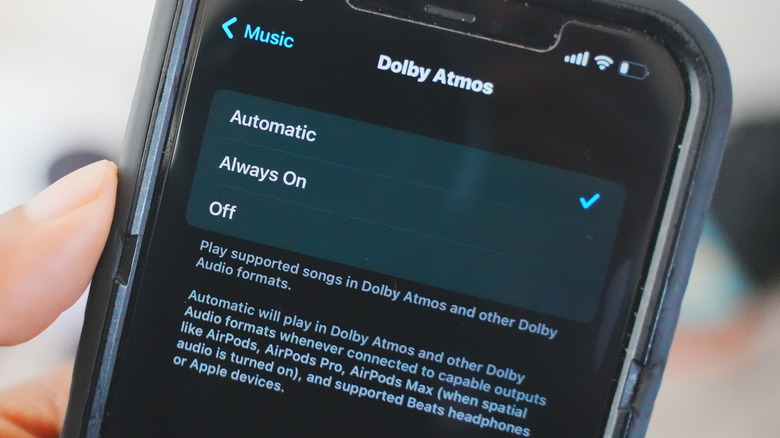
Chances are, the error occurs when the app fails to properly load all of the data associated with lossless and spatial audio codecs like Dolby Atmos because many users seem to report success when disabling that feature. To do so is simple:

  • Go to the Settings app.

  • Scroll to Music.

  • Under Audio, select Dolby Atmos.

  • Choose the Off option.

Now, try your track again. Hopefully, you’ll hear the sweet sounds you’re after. If you must have spatial audio, try turning it back on and playing the track. With luck, the issue should only hamper your listening experience temporarily, and you won’t have to go without your enhanced tunes permanently.

How to fix Apple Music error code 9039
iTunes Store logo on iPhone

BigTunaOnline/Shutterstock

Based on various reports from Apple’s Support community, you’ll most commonly encounter error code 9039 when adding new songs to your Apple Music playlists — particularly when using the Apple Music app on a Mac (formerly iTunes, which is still the app’s name if you’re using it on Windows). Generally, Apple community specialists recommend signing out of Music and signing back in:

  • Head to Account > Sign-out to completely sign out of iTunes.

  • Quit iTunes and relaunch the app.

  • Sign back in using Account > Sign in.

Additionally, you can try resetting the Music/iTunes app’s cache:

  1. Click the Edit menu, then select “Preferences.”

  2. Click on the “Advanced” button.

  3. Select Reset iTunes Store cache and click “OK.”

You might also need to reauthorize your computer by heading to Account > Authorizations > Authorize This Computer. If all else fails, try completely uninstalling the Music/iTunes app and reinstalling it from the Mac App Store or Windows Store.

Other things you can try
Apple Music Sync Library setting

Quentyn Kennemer / SlashGear

One of the most obvious steps to take when encountering any error is to reboot your device. If that’s not helping, ensure you’re updated to the latest version of both the app you’re using and the platform where you’re running it.

Don’t want to uninstall anything? Consider signing out and then signing back in. This should clear the cache and give you a “reset” to help resolve any weirdness. However, this will remove any music you’ve downloaded for offline listening, so you’ll need to redownload those songs or playlists.

If you’re fully updated, and rebooting hasn’t worked, try uninstalling and reinstalling Apple Music. You can download Apple Music for iOS here, or find the Android version here. If the issue is with desktop apps, you can download Apple Music from the Mac App Store on Apple laptops, or the Windows Store if you’re on Windows.

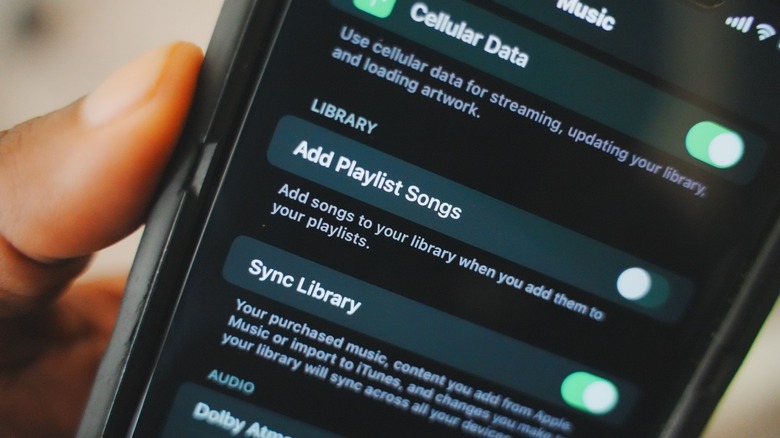
Lastly, you might find success by disabling and reenabling Sync Library. Here’s how to do it on iPhone:

  1. Make sure that your iPhone or iPad is signed in with the same Apple ID that you use with your Apple Music subscription.

  2. Go to Settings.

  3. Tap Music.

  4. Under “Library,” toggle the “Sync Library” option.

Hopefully, you’ll have resolved your issue by now. If not, you may just need to give Apple Music a little rest and come back to it later. If the issues persist chronically, then you might want to contact Apple customer support for further assistance.

Read More
Margherita Menjivar

Latest

Amtrak Set to Upgrade Key Philadelphia Power Converter Station

Photo courtesy STV  STV is developing preliminary design for one of the largest railway converter stations in the world, owned by Amtrak. Amtrak has selected STV to develop the preliminary design to replace the Richmond Static Frequency Converter (SFC) #4 in Philadelphia. The facility is Amtrak’s largest traction power converter station and one of the largest railway

How Will Bitcoin, Ethereum and XRP React if CLARITY Act Passes or Fails?

The CLARITY Act has become a major regulatory focus for the crypto industry. However, Alex Tapscott, CEO of CMCC Global Capital Markets, said prediction markets may be overstating its chances of passing. While markets currently assign the bill roughly 47% to 50% odds of becoming law, Tapscott said it may struggle to secure enough bipartisan

Bitcoin Price Today: Weak Spot Demand Keeps BTC Under Pressure

Bitcoin price today remains under pressure as spot demand continues to weaken despite periodic increases in futures trading activity. According to the analysis, combined spot and futures demand is estimated at -127,000 BTC, a level considered too weak to support a sustained uptrend. The report suggests the recent market stabilization is driven more by seller

AAVE Price Could Be One Breakout Away From a Massive Rally

AAVE price is approaching a pivotal technical milestone after climbing 8%, with derivatives markets signaling growing confidence among bullish traders. The latest rally has pushed the DeFi token within striking distance of a resistance zone that has defined its broader downtrend for months. A decisive breakout from here could reshape market sentiment and establish the

Newsletter

Don't miss

Amtrak Set to Upgrade Key Philadelphia Power Converter Station

Photo courtesy STV  STV is developing preliminary design for one of the largest railway converter stations in the world, owned by Amtrak. Amtrak has selected STV to develop the preliminary design to replace the Richmond Static Frequency Converter (SFC) #4 in Philadelphia. The facility is Amtrak’s largest traction power converter station and one of the largest railway

How Will Bitcoin, Ethereum and XRP React if CLARITY Act Passes or Fails?

The CLARITY Act has become a major regulatory focus for the crypto industry. However, Alex Tapscott, CEO of CMCC Global Capital Markets, said prediction markets may be overstating its chances of passing. While markets currently assign the bill roughly 47% to 50% odds of becoming law, Tapscott said it may struggle to secure enough bipartisan

Bitcoin Price Today: Weak Spot Demand Keeps BTC Under Pressure

Bitcoin price today remains under pressure as spot demand continues to weaken despite periodic increases in futures trading activity. According to the analysis, combined spot and futures demand is estimated at -127,000 BTC, a level considered too weak to support a sustained uptrend. The report suggests the recent market stabilization is driven more by seller

AAVE Price Could Be One Breakout Away From a Massive Rally

AAVE price is approaching a pivotal technical milestone after climbing 8%, with derivatives markets signaling growing confidence among bullish traders. The latest rally has pushed the DeFi token within striking distance of a resistance zone that has defined its broader downtrend for months. A decisive breakout from here could reshape market sentiment and establish the

Pump.fun (PUMP) Price Prediction 2026,2027-2030: Will PUMP Lead Solana’s DeFi Boom?

Story Highlights The Live Price Of Pump.fun is Loading live price Predictions suggest PUMP could reach $0.01 in Q1 2026. Long-term forecast sees PUMP reaching $0.22 by 2030 in a moderate scenario. PUMP.fun (PUMP), a utility coin launch platform for launching Solana-based memecoins with its viral “no-code” model that makes token creation easy for everyday

Want Your Business to Be Seen Everywhere? Meet Tonia Ryan, Creator of Fix Your Search

Some people are good at their jobs. Then there is Tonia Ryan, who has turned “getting found online” into something close to magic. She is the creator of Fix Your Search, and if you have ever wondered why some businesses pop up everywhere while others seem invisible...

Grey Business processes $61 million as stablecoins dominate payments

Grey Business enables startups and SMEs to open US Dollar (USD) corporate accounts, send and receive international payments, convert currencies, and transact using stablecoins such as USDC and USDT...

Utah Marketers to Host Free Business Networking Event in Layton on June 24

The custom web design company is hosting free monthly networking events for Northern Utah business leaders, with the next event scheduled for June 24 from 4 to 6 p.m. Utah Marketers is hosting a free local business networking event on June 24 from 4 to 6 p.m. at the company’s Layton office. The event is