

Kamil Zajaczkowski/Shutterstock
By Rob Rich/April 1, 2023 5:00 pm EST
Photo Cutout is a relatively new feature brought to the iPhone via iOS 16. It lets you quickly and intuitively select the subject of a photo to separate it from the background. This could be for your artistic purposes, aesthetic issues with the original setting of the picture, or any other reasons you may have for wanting to create an image of a person, building, animal, utensil, and so on in a white void.
It’s akin to someone manually clipping photo elements in a visual editing app. Unlike those apps, the iOS 16 feature doesn’t require extensive knowledge of a program or design know-how. Something that might take a few minutes (or longer, depending on the image complexity) can be done in seconds — though since the separation is left to your iPhone, it may require some adjustments after the fact.
Before using Photo Cutout on your iPhone, be aware that it requires iOS 16 and an iPhone XS or newer. If you’re using an older model or version of iOS, it won’t work for you.
Using Photo Cutout in iOS 16
Rob Rich/SlashGear
It’s straightforward to start using Photo Cutout (assuming you’re using a compatible iPhone and version of iOS), with no need to turn anything on in settings.
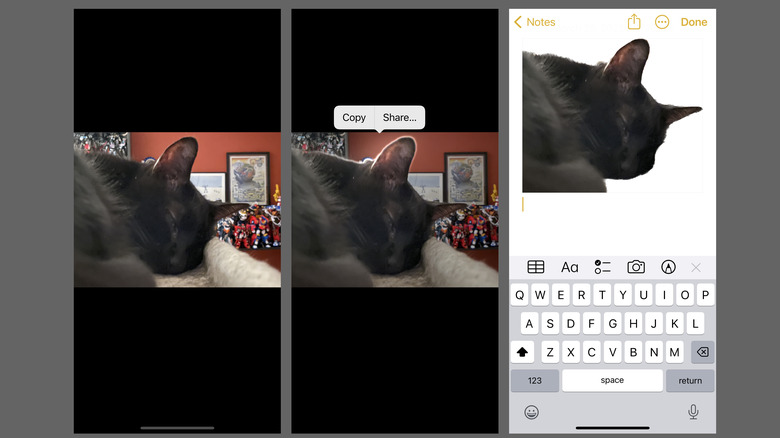
- Find or open the photo you want to cut the subject out of. This can be in the Photos app, through the Safari web browser, Messages, and so on.
- Tap and hold a finger on the subject you want to cut out.
- If the subject is sufficiently distinct from the background, you’ll see a glowing white outline begin to circle the subject, along with a pop-up menu.
- Tap Copy or Share… in the pop-up menu to either copy the subject image to your iPhone’s clipboard or send the cutout to another app or user.
- Copied subjects can be pasted into other apps like Notes and Messages.
- Shared subjects can also be copied, uploaded to other apps, sent to the Printer, saved as a separate image, etc.
The Photo Cutout feature is surprisingly accurate when discerning subjects from the background, but it’s not always perfect. Depending on the photo and other visual factors, the results may be a little fuzzy around some edges, or some details might accidentally get clipped. If you want a pristine cutout, you may need to paste the subject into a photo editing app for manual adjustments. If the feature keeps ignoring something you want to include, you might have to edit the background manually.
Read More
Luz Schewe