

Oleg Lyfar/Getty Images
There’s nothing more heartwarming than sending your friend well wishes on their special day. However, gone are the days when you have to drop by your local greeting card shop to buy your friend a birthday card. Nowadays, you can just send them a digital card instead. One of the best ways to do so is through Facebook.
The app has been one of the go-to places to look up someone’s birthday and celebrate it, so it’s no surprise that it comes with several ways to send your friend a virtual birthday card. If you want to greet your friend using stories, you can do so with Facebook’s birthday stories feature. If you want your greeting to be more permanent instead, you can simply post it on their timeline. If you want to send them something private, however, there are websites that let you send virtual cards to your friend via Facebook Messenger.
How to send a Facebook Stories virtual birthday card
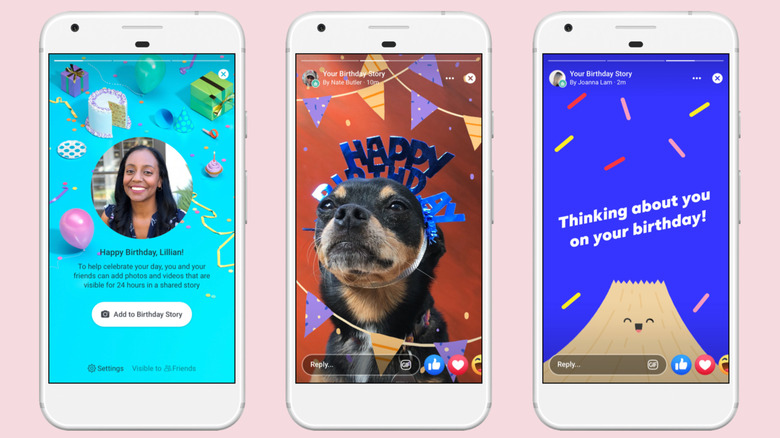
In 2019, Facebook released a new feature that lets you send digital birthday cards to your friends using Stories. Here’s how it works:
- Open the Facebook app.
- Go to Notifications.
- Tap on the birthday notification to see Facebook friends who are currently celebrating their birthdays.
- Choose your friend from the list.
- Select the birthday card you want to send.
- (Optional) Add text, stickers, or music to the story.
- When you’re done editing the birthday card, tap on Share To.
Your card will be posted on your friend’s birthday story, along with the other birthday cards that their Facebook friends sent. Unfortunately, this feature will only work if your friend’s birthday is visible to you. If they’ve set it to private, you won’t be able to send them a dedicated birthday card story, but you can still create one using your own Stories.
- On your Facebook home page, select Create story.
- Select the type of story you want to make. It can either be a picture or video from your phone’s Gallery or just text with a colorful background.
- Type your birthday wish and tag your friend by typing “@” followed by their Facebook name.
- Tap on the Share button to post your story.
Your friend will get a notification about the story and will be able to view it when they tap on the alert.
How to send a virtual birthday card to your friend’s Facebook profile
Marinel Sigue/SlashGear
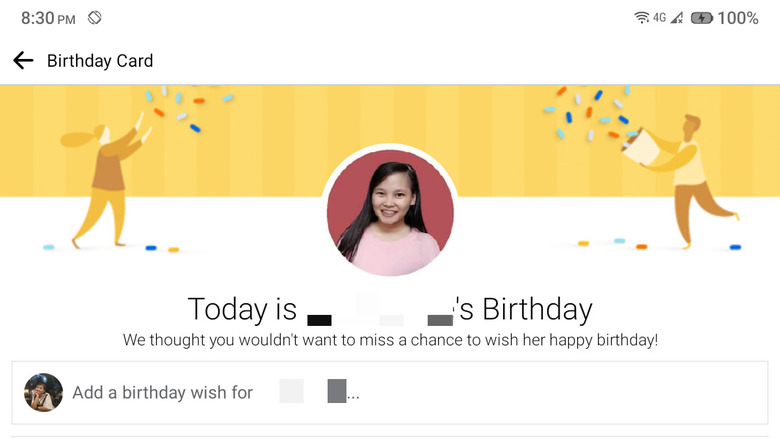
One of the easiest ways to send your friend a virtual card on their birthday is through their Facebook profile. Here’s what you need to do:
- Open your friend’s Facebook profile.
- If their birthday is set to Friends or Public, you will automatically be prompted to post a message on their timeline. Otherwise, you can simply click on “Write something to.”
- Choose the type of post.
- Background color: This adds a fun, colorful background to your message.
- GIF: This adds a moving image to your post. If you selected GIF, type “birthday” on the search bar to show birthday GIFs only.
- Type your message for the birthday celebrant.
- Hit the Post button on the top-right corner of the screen.
You can then see your birthday card on your friend’s timeline. Depending on their profile settings, your post can be seen by only them, their friends, or anyone (public).
How to send a virtual birthday card in Facebook Messenger
Marinel Sigue/SlashGear
If you’re self-conscious about other people reading your birthday wish and want to send a birthday card to your friend privately, you can use a third-party e-card website that supports Facebook sharing.
1. Go to Open Me‘s website.
2. Select the virtual card you want to send.
3. Customize the card by adding a photo and note in the “Inside View.”
4. Once you’re done editing the card, click on “Continue to digital preview.”
5. Select “Continue to delivery options.”
6. Create an Open Me account to proceed with sharing the virtual card.
7. In the Delivery Method page, select Facebook.
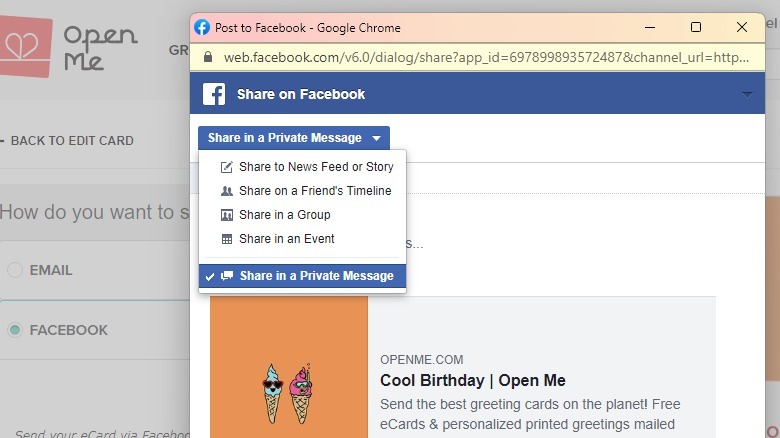
8. Click on the Share on Facebook button.
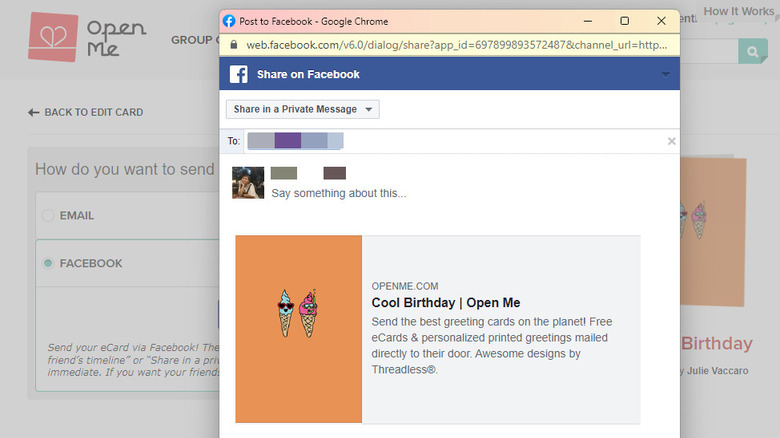
9. In the new window, select the Share to News Feed or Story button in the top-left corner.
10. Choose Share in a Private Message.
 Marinel Sigue/SlashGear
11. In the To field, type your friend’s name and click on it.
12. (Optional) Type your birthday wish in the body field.
13. Press Send Message at the bottom of the window.
When your friend receives the message, they need to click on the card to open it on the website. They then have the option to post it on their Facebook wall. If the virtual cards on the website aren’t your style, you can also go to your friend’s Messenger. Then, select the emoji icon on the far right and choose the GIF tab. Type “birthday” on the search bar and tap on the GIF you like; it will automatically be sent to your friend.
Read More
Buffy Redner