


By
Jon Bitner
Roborock makes some of the best robot vacuums on the market. Offering sleek designs, impressive performance, and the ability to work automatically without manual input, these popular devices make it easy to keep your home clean. However, just because they can function without manual input doesn’t mean you can forget about them entirely. In fact, you’ll still need to perform routine cleaning and maintenance on your Roborock robot vacuum. Thankfully, the process is incredibly easy and shouldn’t take more than a few minutes of your time.
Here’s how to clean a Roborock robot vacuum to keep it working like new.
John Velasco / Digital Trends
Prep your home before each Roborock run
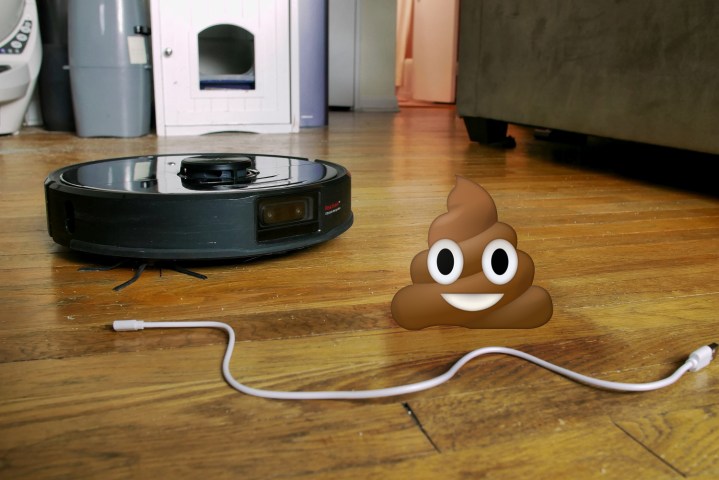
Before discussing any steps you can take to clean your Roborock, it’s important to note that you can make your cleaning routine easier by simply prepping your home before your Roborock heads out on a vacuuming mission. Much of your cleaning will involve pulling out foreign objects or long fibers from the underside of your vacuum – so picking up dog toys or other small objects is a great way to keep your Roborock working like new. So be sure to do a quick sweep of your home to make sure there’s nothing that can pose a threat to your trusty robot companion.
How to clean your Roborock robot vacuum
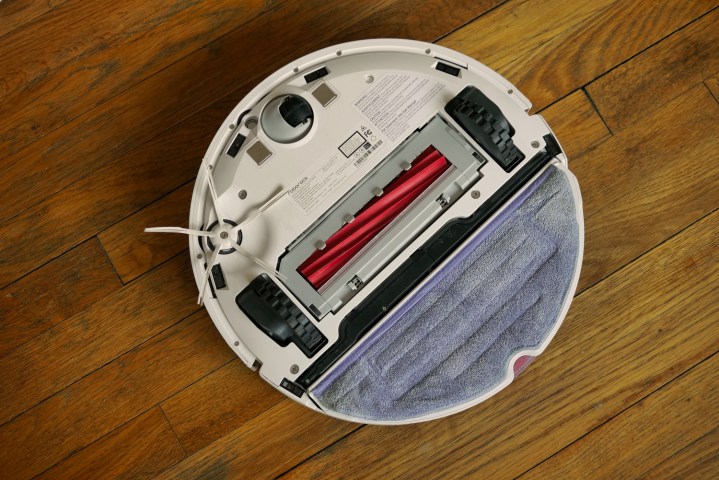
To clean your Roborock vacuum, the first thing you need to do is turn it off to prevent it from accidentally activating. With that step out of the way, here’s how to perform routine maintenance and cleaning of your robot vacuum.
Step 1: Empty the dustbin. Once it’s empty, take a paper towel and try to clean any remaining gunk out of its corners. You can use a wet cloth for any troublesome areas, but be sure to remove filters and let the dustbin dry before reinserting it.
Step 2: Empty and clean your filters. You’ll first want to lightly shake them or gently tap the side of the filters to remove large debris, then use a soft-bristle brush to remove the remaining dust. Depending on your model, you might also be able to wash filters with water (just make sure they’re dry before reinstalling).
Step 3: Clean your roller brush. This could involve cutting away large pieces of fabric that have become lodged between bristles, or it might simply mean giving it a quick wipe down with a towel to remove dust buildup. You’ll also want to check the roller brush cavity and brush guard for foreign objects and additional debris.
Step 4: Clear the rotating brush by removing any hair or fabric stuck to its bristles. Most models allow this brush to detach from the robot vacuum, making it easier to clean.
Step 5: Use a microfiber cloth to wipe down the robot vacuum sensors. Do not use any sort of cleaning solution to clean these – instead, stick with a dry microfiber cloth or a slightly damp one for more challenging spots.
Step 6: Check your wheels and cut away any fabric, hair, or strings that have become tangled. You’ll also want to clean the part of the wheels that contact your carpet, as these can become dirty during extended use.

Today’s tech news, curated and condensed for your inbox
Check your inbox!
Please provide a valid email address to continue.
This email address is currently on file. If you are not receiving newsletters, please check your spam folder.
Sorry, an error occurred during subscription. Please try again later.
Editors’ Recommendations
-
Smarten up your home with an Amazon Echo Show 8 while it’s 42% off -
This robot vacuum is only $89 at Walmart after this 50% discount -
How to choose a robot vacuum -
Why you need to buy LG’s Cordless Vacuum while it’s $300 off -
Today Only: Save $280 on this 3-camera home security camera kit
Samsung makes a robot vacuum, and it’s $480 off today

Samsung has one of the best robot vacuum deals around right now, although you’ll need to do a tiny bit of work to get the full discount. The Samsung Jet Bot+ Robot Vacuum with Clean Station is currently $420 instead of $800 so you save $380. However, scroll down on the listing and tell Samsung what robot vacuum you previously owned and you save an extra $100 once you add the robot vacuum to your cart, bringing it down to $320. A saving of $480 is a huge deal and one we can’t see sticking around for long. Here’s a quick look at why it’s worth it.
Why you should buy the Samsung Jet Bot+ Robot Vacuum with Clean Station
The Samsung Jet Bot range features in our look at the best robot vacuums thanks to its great functionality. The Samsung Jet Bot+ Robot Vacuum is a super useful way to keep your home clean and tidy. It uses LiDAR sensors to create accurate room maps for the Jet Bot to navigate. From there, mapping can be controlled using your smartphone so you can get your home cleaned far more efficiently than before. The Jet Bot+ has a comprehensive five-layer filtration system that means as air enters, multiple filters trap 99.99% of micro dust while still releasing clean air.
How to change the owner on a Ring Doorbell
Selling or buying a home is already a hassle, and if you’re moving to (or from) a place that’s outfitted with tons of smart home gear, the process becomes a bit more complex. Not only will you have to wipe all the data from your old smart home gear, but you’ll have to take over control of all the smart home gadgets at your new place.
How to turn off the clock on your Echo Dot

The Echo Dot with Clock is one of the newest additions to the Echo family. Beyond offering all the features found on the standard Echo Dot, this nifty smart home gadget also includes a minimalist display – which can show the time or other relevant info. However, if you end up disliking this low-tech display, Amazon gives you an easy way to turn it off. Here’s a closer look at how to turn off the clock on your Echo Dot, along with a quick way to change its brightness.
Read More
Jon Bitner