

- Google Drive adds thumbnail previews when watching videos
- Much like YouTube, it will let you spot exact moments in videos
- It’ll be available to all Google Drive users soon
Scouring through videos to find the moment you need should soon get a lot easier thanks to a new update coming to Google Drive.
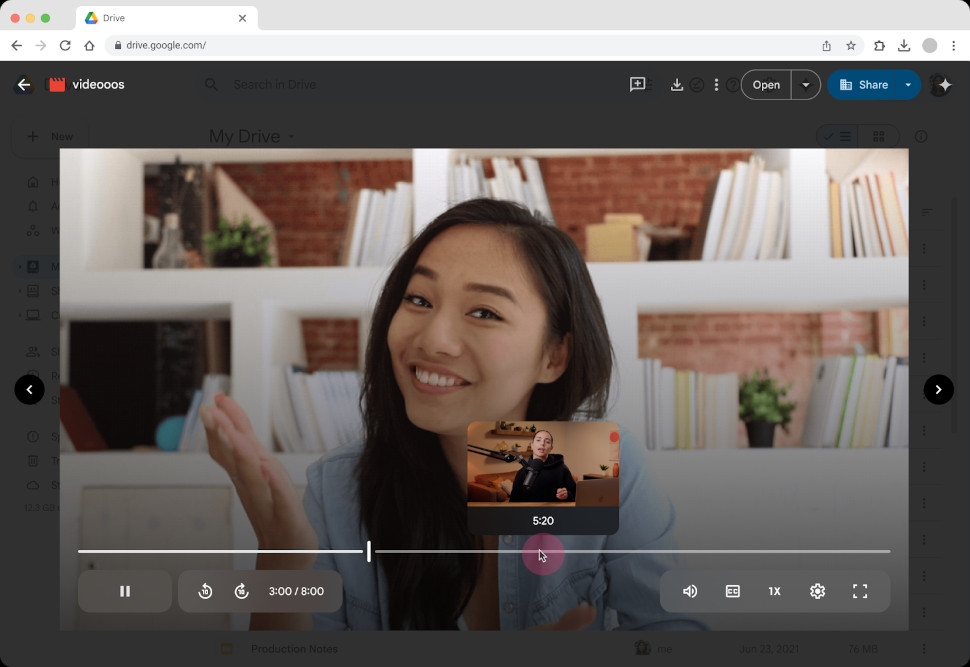
The cloud storage platform has revealed users will now be able to see a thumbnail preview image when hovering over a video’s progress bar.
Much like when viewing a video in YouTube, this feature should allow users to quickly navigate around a video, making it easier to track down the specific moments they need.
Google Drive video thumbnails
“With the ability to find the right moments in videos, this update improves productivity and the overall video viewing experience in Google Drive,” the company wrote in a Google Workspace updates blog post.
The feature will only be available for new videos uploaded to your Drive account via web or mobile app.
Users will then need to open the newly uploaded video in Drive web, and can then simply hover their mouse over the video progress bar to see thumbnail previews. Dragging your mouse along the progress bar will let you quickly run through the video using the thumbnails to find the spot you need.
What’s even better is that the feature will be open to all users, with the company noting it will be on offer to all Google Workspace customers, Google Workspace Individual subscribers, and users with personal Google accounts.
It is rolling out now, and also won’t require any extra admin control to utilize.
The feature is the latest in a series of Google Workspace upgrades aiming to boost productivity among users.
The company revealed a host of new AI tools and services for Google Workspace earlier this year, including Generated Background Images and Studio Look, Studio Lighting, and Studio Sound for Google Meet, as well as Translate for me, coming to Google Chat.
This was soon followed by a number of AI-powered office software upgrades at its Google Cloud Next 25 event designed to give users a productivity and creativity boost when they need it most, including new audio tools in Google Docs which can create listenable versions of your document, as well as upgraded analysis tools for Google Sheets to help get the most out of your data.