

Svitlana Kunets/Getty Images
YouTube has tons of features you’ll kick yourself for not using – ones that can help you improve your viewing experience. However, most of them won’t be of any use if you experience a black screen while watching YouTube. Unfortunately, the problem isn’t limited to a specific platform. You can experience the black-screen YouTube issue while using its app on your smartphone, or on a web browser like Chrome on your computer.
Advertisement
Often, the issue stems from a temporary bug or glitch in the app or the browser you’re using. In such a case, simply closing the video you’re watching and restarting it fixes the problem. Relaunching the YouTube app, or reloading the YouTube page on your browser also helps in getting rid of such bugs and glitches.
But if the problem continues to occur even after trying these fixes, it signals that it’s time to get into some advanced troubleshooting. We’ll show you how to get rid of the YouTube black-screen problem so you can continue watching your favorite videos.
Clear the corrupt cache
Ihar Halavach/Shutterstock
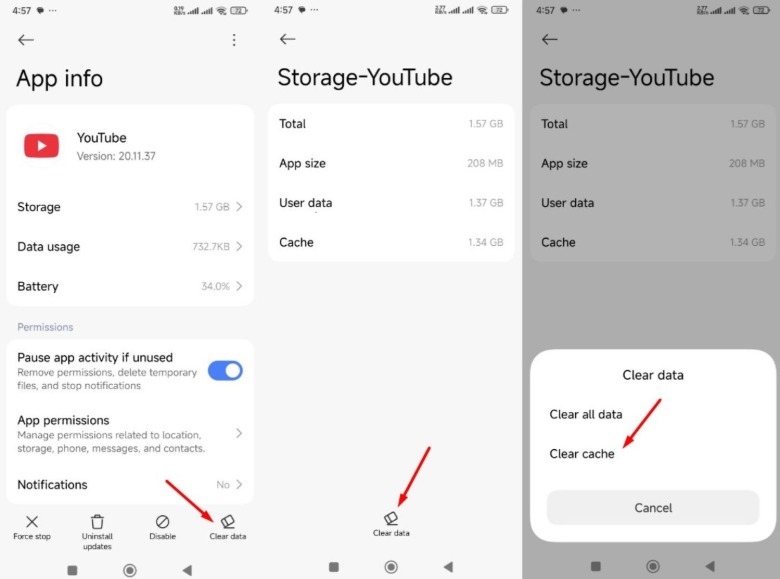
Like all the apps installed on your smartphone, the YouTube app stores cache data, which is temporary data containing thumbnails, videos, and other information YouTube requires to load content faster. But for various reasons, this data can get corrupt and cause issues like the one at hand. You’ll need to clear the YouTube cache data to solve the problem. Here’s how to do this on your Android smartphone.
Advertisement
 Aman Kumar/SlashGear
- Open the Settings app and navigate to Apps > YouTube > Storage.
- Tap Clear data.
- Choose Clear cache and then OK.
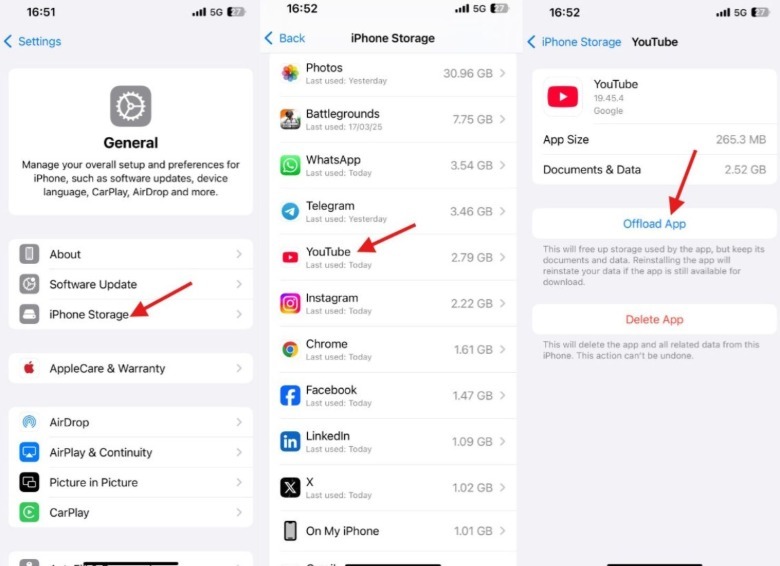
Unlike Android, there’s no direct way to clear app cache data on an iPhone. Instead, you’d need to offload the YouTube app, which will do the same thing as clearing the cache.
 Aman Kumar/SlashGear
- Launch the Settings app and head towards General > iPhone Storage > YouTube.
- Tap the Offload App button.
- Now, go to your iPhone home screen and tap the YouTube app to redownload it from the App Store.
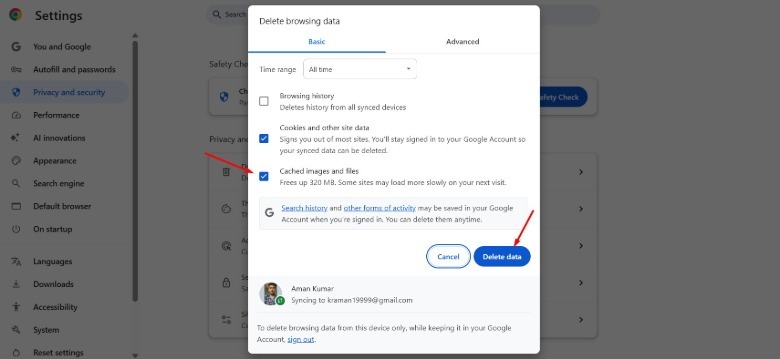
If you’re facing the problem on your computer’s browser, then you need to clear the browser cache data to fix the issue. We’ll show how to do it on Google Chrome, but the process is almost identical to clearing cache on Microsoft Edge, clearing cache on Opera GX, or clearing cache on Mozilla Firefox.
 Aman Kumar/SlashGear
- Open the Chrome browser, click the three dots in the top-right corner, and choose Settings.
- Navigate to Privacy and security > Delete browsing data.
- Choose All time from the Time range drop-down menu, and check the Cached images and files box.
- Then, click the Delete data button.
Uninstall the problematic extension
Aman Kumar/SlashGear
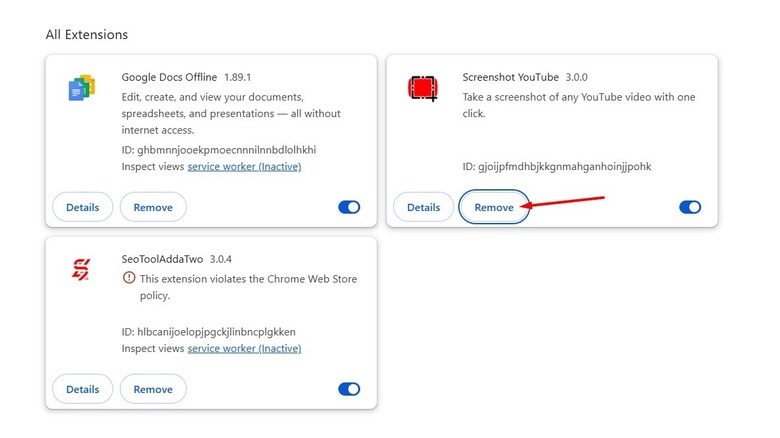
While browser extensions can improve your productivity, some do more harm than good. If you’ve installed any such extensions, they can interfere with the browser and cause issues such as making the browser unstable or making it show a black screen while watching YouTube. The best thing you can do in this situation is to remove that extension from your browser.
Advertisement
Unfortunately, there isn’t any easy way to do this. You need to first disable all the extensions installed in your browser, then enable each extension one by one, and check YouTube after enabling each extension. When you find after enabling a particular extension that YouTube starts to show the black screen again, you’ve got the one that’s responsible. Once you’ve found it, download any available update for it and check if it has fixed the problem. If not, you’re left with no option other than to permanently remove it from your browser.
Disable graphics acceleration
Aman Kumar/SlashGear
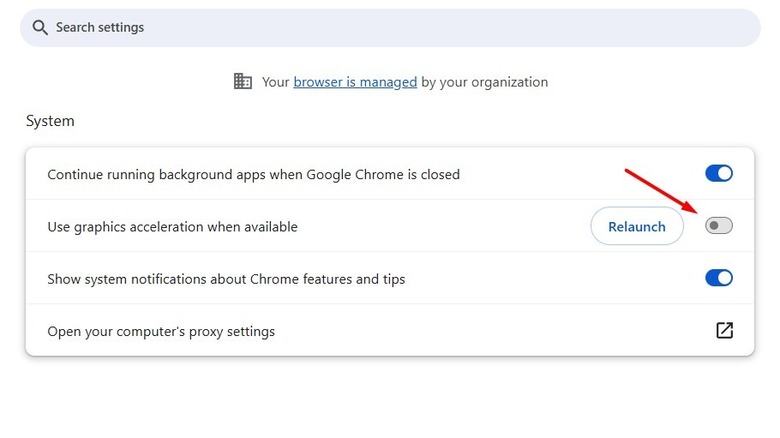
Most modern browsers, including Google Chrome and Microsoft Edge, come with the graphics-acceleration feature. When enabled, your browser uses your computer’s GPU instead of the CPU to perform graphic-intensive tasks like rendering graphics or decoding videos. However, for some reason, this feature is known to cause green and black screen issues on YouTube. To fix this, you need to disable graphics acceleration on your browser. Here’s how to do it on Google Chrome for Windows, but the steps are similar for Mac:
Advertisement
- Launch Google Chrome on your computer, click the three dots in the top-right corner, and select Settings.
- In the Settings menu, choose System from the left sidebar, and disable the “Use graphics acceleration when available” toggle.
- Click the Relaunch button that appears.
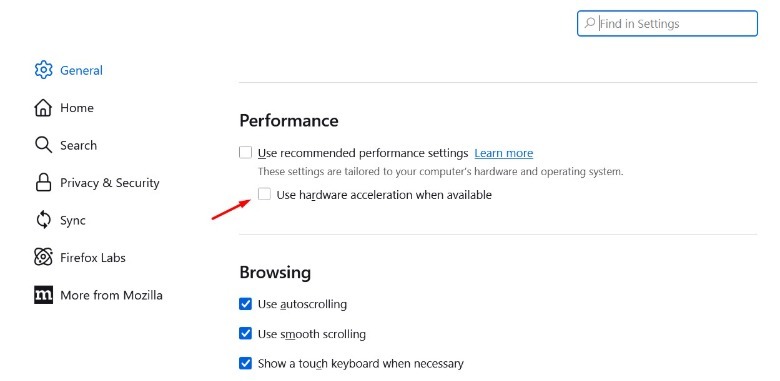
In Edge, you’ll find this option under the System and performance section of the settings menu. In Firefox, you need to access the General option in the Settings menu and uncheck the “Use hardware acceleration when available” box under the Performance section.
 Aman Kumar/SlashGear
Ensure all G-SYNC settings are in sync
Aman Kumar/SlashGear
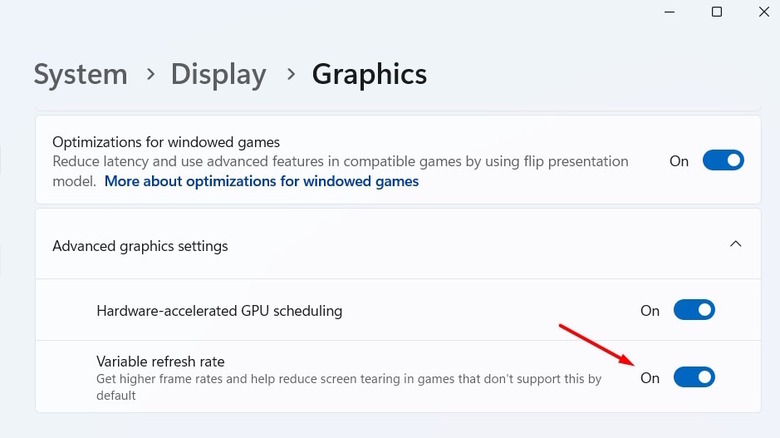
If you have an NVIDIA graphics card and use G-SYNC, you need to ensure that all its settings — Windows settings, the NVIDIA Control Panel settings, and monitor settings — are in sync. If any of these are not in sync with others, then you’re likely to face the black screen issue on YouTube. To ensure everything is in sync, follow these steps:
Advertisement
- Open the Settings app on your Windows PC, and navigate to System > Display > Graphics > Advanced graphics settings.
- Then, enable the Variable refresh rate toggle.
- Open the NVIDIA Control Panel on your computer and choose Set up G-SYNC.
- Check the Enable G-SYNC, G-SYNC Compatible box and select the “Enable for full screen mode” bullet.
- Choose the display you want to change.
- Check the Enable settings for the selected display model box.
Now, open your monitor settings menu and enable G-SYNC in it as well. The process will be different for different monitors — check your monitor’s manufacturer’s website or the user manual to know the exact process to do it.
That’s about it. Restart your computer, and you should no longer be facing the problem.